Stereo Depth
Repository: https://github.com/OlafenwaMoses/vizion3D
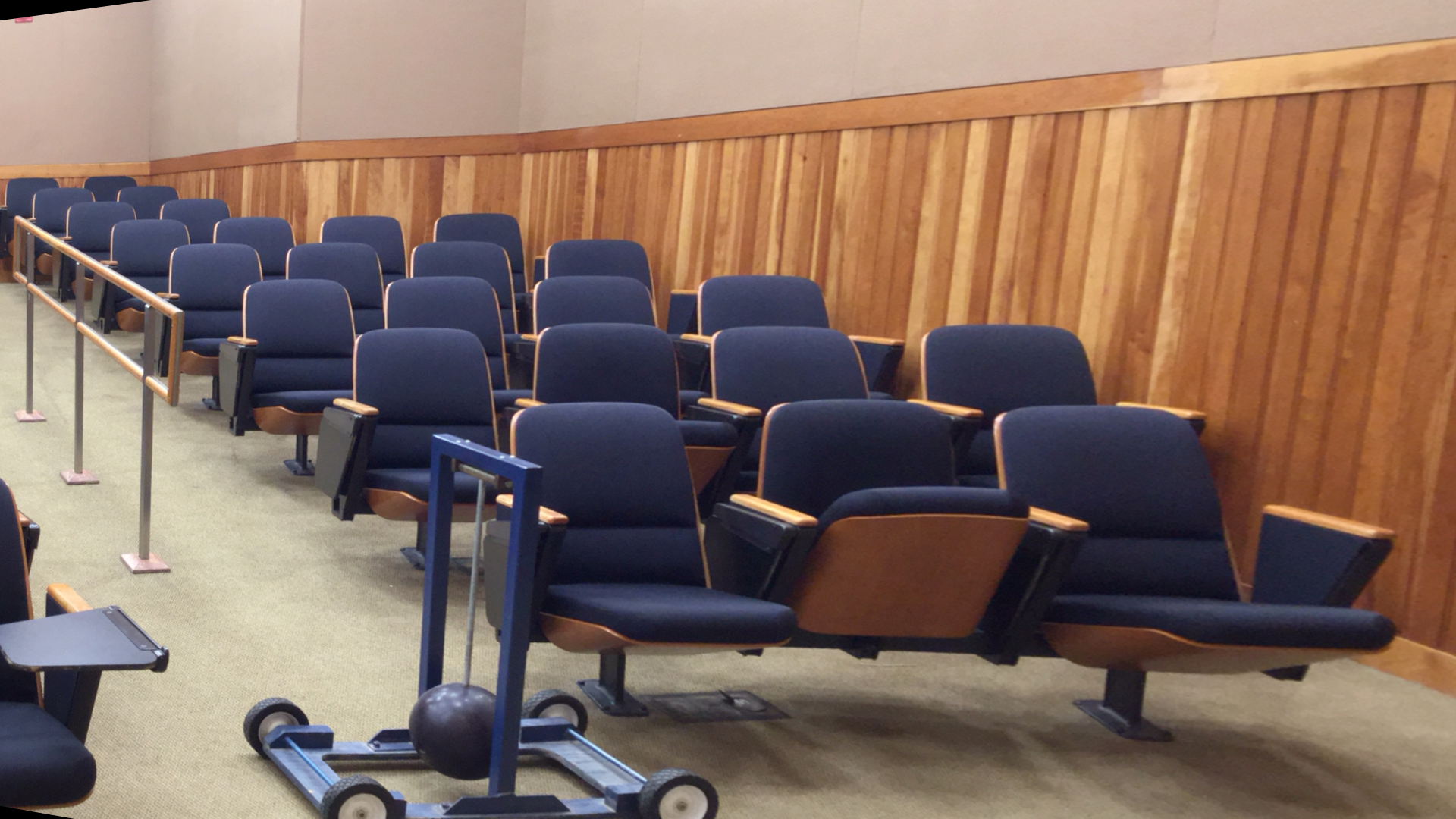
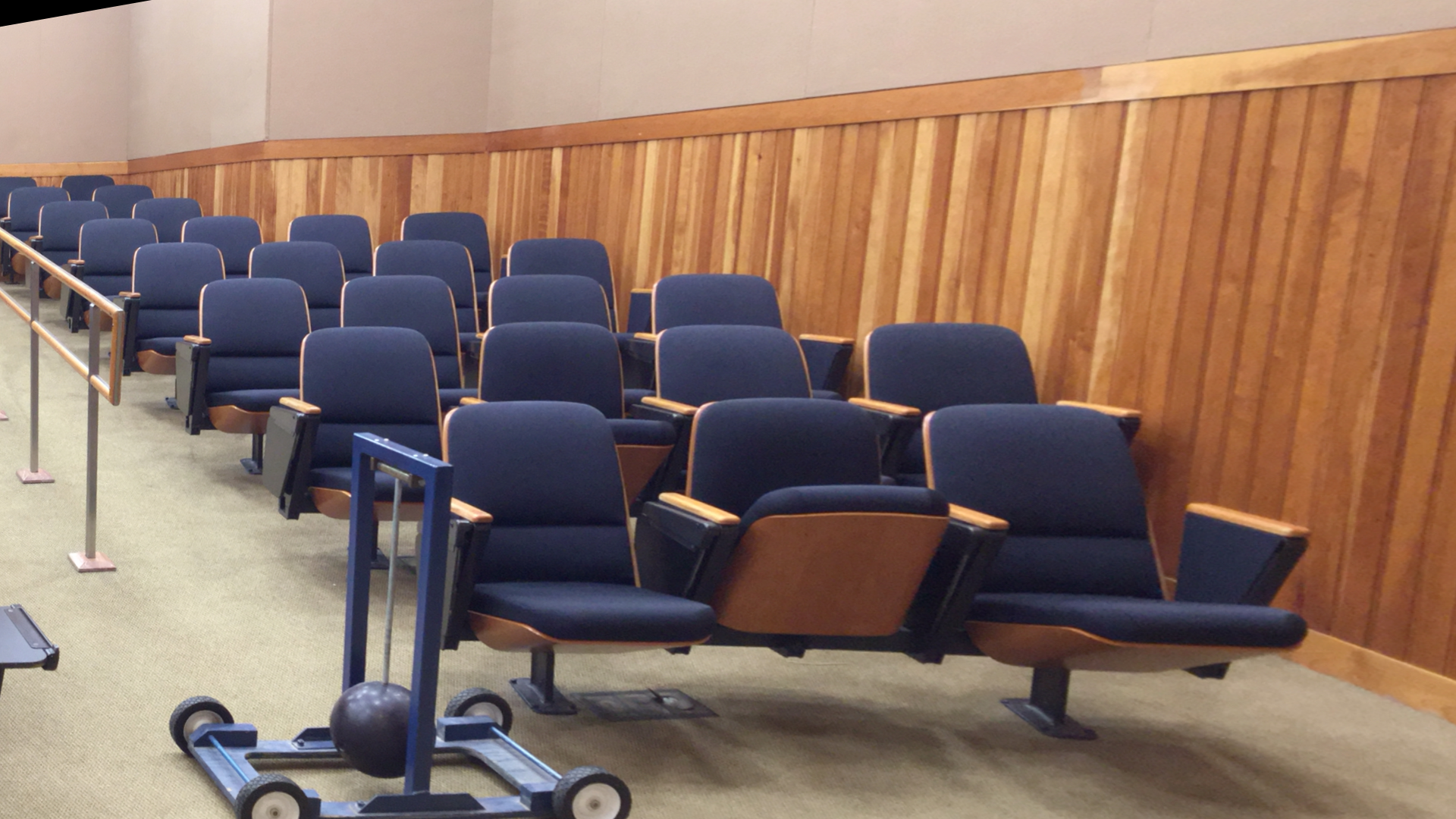
cam0=[1733.74 0 792.27; 0 1733.74 541.89; 0 0 1]
cam1=[1733.74 0 792.27; 0 1733.74 541.89; 0 0 1]
doffs=0
baseline=536.62
width=1920
height=1080
ndisp=170
vmin=55
vmax=142
Category: Lifting (2D → 3D)
Experimental: No
Stereo depth estimation recovers per-pixel metric depth (in metres) from a pair of rectified left/right RGB images by matching corresponding pixels across the two views and applying the stereo geometry formula:
depth_m = baseline_mm × focal_length_px / disparity_px / 1000
vizion3d uses S2M2 (Stereo Matching Model with Multi-scale transformer) as its stereo backend. Unlike Depth Estimation, stereo depth produces real-world metric distances — provided the camera calibration parameters are correct.
Point-cloud output uses OpenGL/viewer camera space: X+ right, Y+ up, and Z- forward into the scene. depth_map remains positive metric depth in metres.
Model backends
Default checkpoint download: stereo-depth-s2m2-L.pth
curl -L \
  https://github.com/OlafenwaMoses/vizion3D/releases/download/essentials-v1/stereo-depth-s2m2-L.pth \
  -o stereo-depth-s2m2-L.pth
| Value | What happens |
|---|---|
| (default) | Downloads the vizion3D release checkpoint (stereo-depth-s2m2-L.pth) to ~/.cache/vizion3d/models/ on first use, then loads it |
Models are kept in memory after the first inference. Set VIZION3D_MODEL_CACHE to override the cache directory.
Command parameters
StereoDepthCommand is the input contract for this task.
| Parameter | Type | Required | Default | Description |
|---|---|---|---|---|
left_image |
str \| bytes |
Yes | — | Left-camera image. Pass a file path string or raw image bytes. |
right_image |
str \| bytes |
Yes | — | Right-camera image (same resolution, horizontally offset from left_image). |
model_backend |
str |
No | vizion3D release checkpoint URL | S2M2 checkpoint. See Model backends above. |
return_depth_image |
bool |
No | True |
If True, the result includes a 16-bit grayscale Open3D Image where closer = brighter (65535 = min_depth, 0 = max_depth). |
return_raw_depth |
bool |
No | True |
If True, the result includes the metric depth as a float32 numpy array (H, W) in metres — unmodified, before any normalisation. |
return_point_cloud |
bool |
No | False |
If True, the result includes an Open3D PointCloud in metres using OpenGL/viewer camera space (X+ right, Y+ up, Z- forward). |
advanced_config |
StereoDepthAdvancedConfig |
No | 1280×720 @ 100 mm baseline defaults | Camera intrinsics and inference settings. See Advanced config below. Not sure what intrinsics are? See Camera Intrinsics Matrix. |
Result fields
StereoDepthResult is the output contract.
| Field | Type | Always present | Description |
|---|---|---|---|
depth_map |
list[list[float]] |
Yes | Metric depth in metres, shape [H][W]. Real-world distances (assuming correct calibration). |
disparity_map |
list[list[float]] |
Yes | Raw disparity in pixels, shape [H][W]. Horizontal pixel offset between matched features. |
min_depth |
float |
Yes | Minimum value in depth_map (metres). |
max_depth |
float |
Yes | Maximum value in depth_map. Guaranteed max_depth >= min_depth. |
backend_used |
str |
Yes | Resolved local file path of the checkpoint used. |
depth_image |
open3d.geometry.Image \| None |
Yes (set return_depth_image=False to suppress) |
16-bit grayscale image, dtype uint16. 65535 = min_depth (closest, brightest); 0 = max_depth (farthest, darkest). |
raw_depth |
np.ndarray \| None |
Yes (set return_raw_depth=False to suppress) |
Float32 array, shape (H, W), metric depth in metres. Unmodified values before any normalisation or encoding. |
point_cloud |
open3d.geometry.PointCloud \| None |
When return_point_cloud=True |
Coloured 3D point cloud, coordinates in metres using OpenGL/viewer convention: X+ right, Y+ up, Z- forward. |
point_cloud_scale |
float |
Yes | Always 1.0 — stereo depth produces real metric coordinates. |
1. Direct Python import — image bytes
from vizion3d.stereo import StereoDepth, StereoDepthCommand

with open("left.png", "rb") as f:
    left_bytes = f.read()
with open("right.png", "rb") as f:
    right_bytes = f.read()

cmd = StereoDepthCommand(left_image=left_bytes, right_image=right_bytes)
result = StereoDepth().run(cmd)

print(f"Depth range : {result.min_depth:.2f} → {result.max_depth:.2f} m")
print(f"Backend     : {result.backend_used}")
2. Direct Python import — file paths
from vizion3d.stereo import StereoDepth, StereoDepthCommand

cmd = StereoDepthCommand(
    left_image="left.png",
    right_image="right.png",
)
result = StereoDepth().run(cmd)

print(f"Depth range: {result.min_depth:.2f} → {result.max_depth:.2f} m")
3. Disparity map
The raw disparity map (in pixels) is always returned alongside the depth map.
import numpy as np
from vizion3d.stereo import StereoDepth, StereoDepthCommand

cmd = StereoDepthCommand(left_image="left.png", right_image="right.png")
result = StereoDepth().run(cmd)

disp = np.array(result.disparity_map)
print(f"Disparity range: {disp.min():.1f} → {disp.max():.1f} px")
4. Depth image (16-bit PNG)
import numpy as np
from PIL import Image as PILImage
from vizion3d.stereo import StereoDepth, StereoDepthCommand

cmd = StereoDepthCommand(
    left_image="left.png",
    right_image="right.png",
    return_depth_image=True,
)
result = StereoDepth().run(cmd)

depth_array = np.asarray(result.depth_image)   # shape (H, W), dtype uint16
PILImage.fromarray(depth_array).save("depth.png")

5. Point cloud
Point coordinates are in real metres using OpenGL/viewer convention: X+ right, Y+ up, Z- forward. point_cloud_scale is always 1.0.
import numpy as np
import open3d as o3d
from vizion3d.stereo import StereoDepth, StereoDepthAdvancedConfig, StereoDepthCommand

cmd = StereoDepthCommand(
    left_image="left.png",
    right_image="right.png",
    return_point_cloud=True,
    advanced_config=StereoDepthAdvancedConfig(
        focal_length=1733.74,
        cx=792.27,
        cy=541.89,
        baseline=536.62,   # mm
    ),
)
result = StereoDepth().run(cmd)

pcd = result.point_cloud
points = np.asarray(pcd.points)               # shape (N, 3), metres
print(f"Points: {len(points):,}")
print(f"Scale : {result.point_cloud_scale} m/unit")  # always 1.0

# Real-world distance between two points
dist = np.linalg.norm(points[0] - points[1]) * result.point_cloud_scale
print(f"p0→p1: {dist:.4f} m")

o3d.io.write_point_cloud("scene.ply", pcd)
6. All outputs at once
import numpy as np
import open3d as o3d
from vizion3d.stereo import StereoDepth, StereoDepthCommand

cmd = StereoDepthCommand(
    left_image="left.png",
    right_image="right.png",
    return_depth_image=True,
    return_point_cloud=True,
)
result = StereoDepth().run(cmd)

print(f"Depth range : {result.min_depth:.2f} → {result.max_depth:.2f} m")
depth_arr = np.asarray(result.depth_image)    # uint16 (H, W)
o3d.io.write_point_cloud("scene.ply", result.point_cloud)
7. Automatic input scaling
The handler automatically resizes both images to fit within 960 × 540 before inference, preserving the aspect ratio. This matches the resolution the model was trained near; running at higher resolutions collapses the internal correlation matrix to near-zero disparity and produces an empty point cloud.
The resize is transparent — disparity and point cloud are reprojected back to the original image dimensions before the result is returned, so all depth values and 3D coordinates are in the original pixel coordinate space. No adjustment to your intrinsics (focal_length, cx, cy) is needed regardless of the input resolution.
8. REST API
Start the server with all REST features enabled:
uv run vizion3d-serve-rest
To preload the stereo checkpoint into memory at startup, pass --stereo_model.
This also enables the stereo-depth endpoint. If this flag is omitted, the
default vizion3D release model is downloaded on first inference and cached under
~/.cache/vizion3d/models/.
uv run vizion3d-serve-rest \
  --stereo_model /models/stereo-depth-s2m2-L.pth
The REST server can expose only selected features. If none of
--depth_estimation, --stereo_depth, --depth_model, or --stereo_model is
provided, all features are enabled. If any of those flags is provided, only the
selected features are enabled. A model path flag selects and preloads its
feature:
# Only POST /lifting/stereo-depth
uv run vizion3d-serve-rest --stereo_depth

# Only stereo depth, with the model loaded before the first request
uv run vizion3d-serve-rest \
  --stereo_depth \
  --stereo_model /models/stereo-depth-s2m2-L.pth

# Enable both depth estimation and stereo depth explicitly
uv run vizion3d-serve-rest \
  --depth_estimation \
  --stereo_depth \
  --depth_model /models/depth_anything_v2_vitb.pth \
  --stereo_model /models/stereo-depth-s2m2-L.pth
Send a request with two image files:
curl -X POST "http://localhost:8000/lifting/stereo-depth" \
  -F "left_image=@left.png" \
  -F "right_image=@right.png" \
  -F "focal_length=1733.74" \
  -F "baseline=536.62" \
  -F "cx=792.27" \
  -F "cy=541.89" \
  -F "return_point_cloud=true"
The response is a JSON-serialised StereoDepthResult. Binary fields (depth_image, point_cloud_ply) are base64-encoded.
9. gRPC API
Start the server:
uv run vizion3d-serve-grpc
Call from a gRPC client:
import grpc
from vizion3d.proto import lifting_pb2, lifting_pb2_grpc

channel = grpc.insecure_channel("localhost:50051")
stub = lifting_pb2_grpc.LiftingServiceStub(channel)

with open("left.png", "rb") as f:
    left_bytes = f.read()
with open("right.png", "rb") as f:
    right_bytes = f.read()

request = lifting_pb2.StereoDepthRequest(
    left_image_bytes=left_bytes,
    right_image_bytes=right_bytes,
    return_point_cloud=True,
    advanced_config=lifting_pb2.StereoDepthAdvancedConfig(
        focal_length=1733.74,
        baseline=536.62,
        cx=792.27,
        cy=541.89,
    ),
)
response = stub.RunStereoDepth(request)
print(f"Min depth : {response.min_depth:.2f} m")
print(f"Max depth : {response.max_depth:.2f} m")
print(f"Backend   : {response.backend_used}")
Advanced config
StereoDepthAdvancedConfig supplies the camera calibration needed for accurate metric depth.
| Field | Type | Default | Description |
|---|---|---|---|
focal_length |
float |
1000.0 |
Focal length in pixels (assumes fx = fy). Override with your calibration. |
cx |
float |
640.0 |
Principal point x (pixel column of optical axis). |
cy |
float |
360.0 |
Principal point y (pixel row of optical axis). |
baseline |
float |
100.0 |
Stereo baseline in millimetres. |
doffs |
float |
0.0 |
Disparity offset (non-zero for Middlebury-style calibration). |
z_far |
float |
50.0 |
Max depth in metres for point cloud. |
conf_threshold |
float |
0.1 |
Min per-pixel confidence score for point cloud inclusion. |
occ_threshold |
float |
0.5 |
Min occlusion score for point cloud inclusion. |
| (input scaling) | — | automatic | Images are automatically resized to fit within 960×540 before inference, preserving aspect ratio. Disparity and point cloud are reprojected back to the original resolution — metric depth and intrinsics are unaffected. |
How to obtain camera intrinsics
From a calibration file (e.g. Middlebury):
# calib.txt format: cam0=[fx 0 cx; 0 fy cy; 0 0 1]
# baseline=B (mm), doffs=d
from vizion3d.stereo import StereoDepthAdvancedConfig

cfg = StereoDepthAdvancedConfig(
    focal_length=1733.74,   # from calib.txt
    cx=792.27,
    cy=541.89,
    baseline=536.62,        # B in mm
    doffs=0.0,              # d from calib.txt
)
From Intel RealSense SDK:
import pyrealsense2 as rs

pipeline = rs.pipeline()
profile = pipeline.start()
left_stream = profile.get_stream(rs.stream.infrared, 1)
intrinsics = left_stream.as_video_stream_profile().get_intrinsics()

cfg = StereoDepthAdvancedConfig(
    focal_length=intrinsics.fx,
    cx=intrinsics.ppx,
    cy=intrinsics.ppy,
    baseline=50.0,   # RealSense D435 baseline ≈ 50 mm
)
Approximation from field of view:
import math

hfov_deg = 90.0  # horizontal FOV from camera spec
image_width = 1280
focal_length = image_width / (2 * math.tan(math.radians(hfov_deg / 2)))

cfg = StereoDepthAdvancedConfig(
    focal_length=focal_length,
    cx=image_width / 2 - 0.5,
    cy=720 / 2 - 0.5,
    baseline=100.0,
)
3D annotation from a stereo cloud
A stereo point cloud is in OpenGL/viewer camera space (Z = -metric_depth, origin at the left camera), making it directly compatible with Object Mask Annotation 3D. Pass the same intrinsics you used for stereo depth. Do not pass image_input — the annotation task synthesises the segmentation image from the point cloud's stored colours, which avoids having to pick between the left and right frames.
import open3d as o3d
from vizion3d.stereo import StereoDepth, StereoDepthCommand, StereoDepthAdvancedConfig
from vizion3d.annotation import ObjectMaskAnnotation3D, ObjectMaskAnnotation3DCommand
from vizion3d.annotation.models import ObjectMaskAnnotation3DConfig

stereo_result = StereoDepth().run(
    StereoDepthCommand(
        left_image="left.png",
        right_image="right.png",
        return_point_cloud=True,
        advanced_config=StereoDepthAdvancedConfig(
            focal_length=1733.74,
            cx=792.27,
            cy=541.89,
            baseline=536.62,
        ),
    )
)

annotation_result = ObjectMaskAnnotation3D().run(
    ObjectMaskAnnotation3DCommand(
        point_cloud=stereo_result.point_cloud,
        return_annotated_cloud=True,
        advanced_config=ObjectMaskAnnotation3DConfig(
            fx=1733.74,
            fy=1733.74,
            cx=792.27,
            cy=541.89,
        ),
    )
)

for ann in annotation_result.annotations:
    print(f"{ann.label:20s}  conf={ann.confidence:.2f}  3D points={len(ann.point_indices)}")

o3d.io.write_point_cloud("annotated.ply", annotation_result.annotated_cloud)
Detection results from the stereo point cloud annotation:
chair                 conf=0.87  3D points=106616
chair                 conf=0.85  3D points=54834
chair                 conf=0.53  3D points=4517
chair                 conf=0.51  3D points=20499
chair                 conf=0.48  3D points=22956
chair                 conf=0.39  3D points=30634
chair                 conf=0.36  3D points=11034
chair                 conf=0.31  3D points=11890
chair                 conf=0.29  3D points=118946
chair                 conf=0.28  3D points=11229
chair                 conf=0.25  3D points=18532
See Object Mask Annotation 3D — Stereo integration for the full walkthrough.
Known limitations
- Rectified pairs required — images must be stereo-rectified so corresponding points lie on the same horizontal scanline. Un-rectified pairs will not produce reliable results.
- Metric scale depends on calibration — an inaccurate
baselineorfocal_lengthscales all depth values uniformly. Always use calibrated values for real applications. - Python 3.12 required for Open3D —
return_depth_imageandreturn_point_cloudrequire Open3D, which currently only supports Python 3.12 in this project.