Scale Observation
Repository: https://github.com/OlafenwaMoses/vizion3D
Category: Observation
Experimental: No
ScaleObservation estimates a single metric scale factor for a generated point
cloud. It is intended for monocular-depth point clouds whose shape is plausible
but whose global size is not guaranteed to be metric.
The task consumes a point cloud plus object annotations from
ObjectMaskAnnotation3DResult.annotations, evaluates object-level metric-size
evidence, and can return the estimated scale, candidate diagnostics, a scaled
point cloud, and a reprojected scaled depth image.
Accuracy note: Scale Observation is a rough metric-scale estimator, not a measurement system. It can put a relative monocular-depth cloud into a more plausible physical size range, but confidence and candidate diagnostics should stay visible in downstream applications.
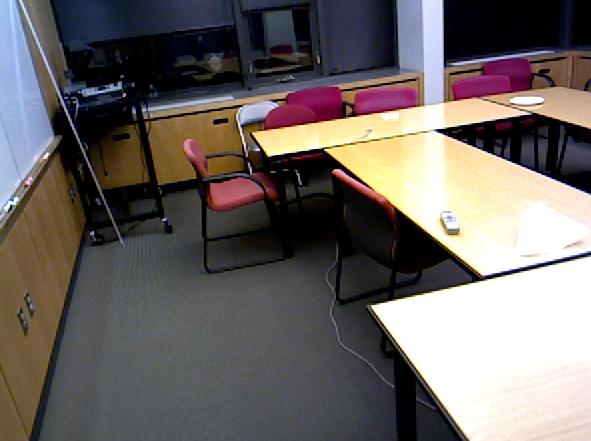
This sample is chosen to make the scale correction visible. The generated
monocular-depth point cloud is much larger than the metric ground truth; after
ScaleObservation applies a 0.531x scale factor, the scaled bounds are close to
the ground-truth bounds.
| Cloud | Width | Height | Length | Mean relative size error |
|---|---|---|---|---|
| Ground truth | 4.53 m | 2.98 m | 4.88 m | — |
| Generated | 8.54 m | 5.82 m | 8.94 m | 89.0% |
| Scaled | 4.53 m | 3.09 m | 4.75 m | 2.2% |
What It Does
Monocular depth models can recover scene layout and object shape, but their
point clouds may be globally too small or too large. ScaleObservation estimates
a uniform multiplier:
scaled_point = generated_point * scale_factor
The multiplier is inferred from detected objects whose real-world size is reasonably constrained, such as chairs, beds, tables, people, appliances, and common indoor objects.
Scale Observation does not change relative shape inside the point cloud. It only applies one global coordinate multiplier.
Pipeline
Typical use is a three-task chain:
- Run
DepthEstimationto produce a generated point cloud. - Run
ObjectMaskAnnotation3Don the same image and point cloud. - Run
ScaleObservationwithannotation_result.annotations.
The annotation input should be the annotations list itself:
annotations = annotation_result.annotations
Each annotation contributes its label, confidence, 2D box, mask, and object point coordinates. The scale estimator uses those fields to decide whether the object is reliable enough to produce metric scale candidates.
Inference Features
The runtime estimator uses the V4.1 scale pipeline:
v4_1_yoloe_strong_dimension_class_trimmed_huber. V4.1 preserves the promoted
V4 results while removing the dormant scene-extent cap, so the final scale flows
from object evidence, trimmed Huber aggregation, and prior blending without an
upper scene-size guard.
| Feature | Purpose |
|---|---|
| Cleaned object points | Removes non-finite points, invalid camera-space depth, and coarse outliers. |
| Object extents | Measures robust width, height, and depth from object sub-cloud percentiles. |
| Bbox area and edge checks | Rejects tiny boxes and truncated objects touching the image edge. |
| Mask area and bbox fill | Rejects weak or empty masks that do not support the object box. |
| Internal depth spread | Rejects objects whose point coordinates are too spread out in depth. |
| Position quality | Downweights far or strongly off-axis objects. |
| Semantic size priors | Compares observed extents to class-level real-world size priors. |
| Dimension reliability | Gives each class/dimension a learned trust weight. |
| Learned calibration | Applies per-class/per-dimension scale correction factors. |
| Scene plausibility | Downweights candidates that imply implausible scene dimensions. |
| Final prior blend | Blends object evidence with a weak global prior when confidence is low. |
Supported Scale Priors
Scale candidates are created only for labels with metric-size priors. The table
contains the COCO-aligned labels used by the default object annotation model and
the expanded prompt-free YOLOE labels that V4.1 can consume when
ObjectMaskAnnotation3D is run with the YOLOE prompt-free checkpoint. Objects
outside these priors can still appear in annotation results, but they are marked
as missing a scale prior and do not produce scale candidates.
| Group | Classes with scale priors |
|---|---|
| People | person |
| Core COCO furniture | chair, couch, bed, dining table, toilet |
| Expanded furniture and fixtures | armchair, office chair, stool, bench, desk, office desk, computer desk, side table, coffee table, cabinet, file cabinet, kitchen cabinet, bookshelf, bookcase, shelf, dresser, nightstand, door, window, mirror |
| Electronics | tv, laptop, keyboard, mouse, monitor, computer monitor, computer, desktop computer, printer, phone, smartphone, tablet, remote |
| Appliances and fixtures | refrigerator, microwave, oven, sink, toaster, blender, coffee machine, dish washer, washing machine, faucet, shower, bathtub |
| Indoor objects | book, vase, potted plant, lamp, table lamp, trash bin, waste container, backpack, suitcase, luggage, pillow, mattress, basket, bucket, box, plant, houseplant |
| Tableware | bottle, cup, bowl |
Common aliases are normalised before lookup. Examples include sofa → couch,
fridge → refrigerator, table → dining table, screen → monitor,
swivel chair → office chair, washer → washing machine, and mug →
cup.
How the Priors Were Generated
ScaleObservation relies on two distinct per-class tables, derived in two
different ways. Both live in
vizion3d/observation/defaults.py.
1. Size priors — hand-authored physical references
The size priors (SCALE_SIZE_PRIORS_M, made up of the COCO and YOLOE tables)
are not fitted from any dataset. Each class stores, per dimension, a
(mean_m, sigma_m) pair plus a coarse per-class reliability weight r:
mean_m— a representative real-world size in metres.sigma_m— a deliberately wide spread, because these are priors, not exact measurements. High-variance classes (vase, potted plant, box) get large sigmas and lowr.r— how much the class is trusted to drive scene scale at all.
The means and sigmas are taken from public reference catalogues, and the source
for each class is recorded inline in defaults.py. The families used are:
| Class group | Reference source |
|---|---|
person |
CDC/NCHS adult stature tables (height); broad body-envelope for width/depth |
chair |
BIFMA / ergonomic chair ranges and product dimensions |
couch, bed, dining table, sink |
Dimensions.com collections and common product sizes |
toilet |
Rempros / Angi toilet dimension guides |
tv |
Dimensions.com display references (43–55 in) |
refrigerator |
RTINGS refrigerator size guide |
microwave, oven, electronics |
KitchenAid / Wayfair guides and common product specifications |
| Expanded YOLOE furniture, fixtures, appliances | Common product-dimension references, authored the same way |
A per-class/per-dimension reliability table
(DIMENSION_RELIABILITY_BY_LABEL) is likewise hand-tuned. It encodes which axes
of a class are stable enough to influence scene scale — for example a person's
height is trusted while their depth is not, and a TV's thin depth is treated as
near-useless.
2. Calibration corrections — learned from ground truth
The calibration table (CALIBRATED_SCALE_CORRECTION_BY_LABEL_DIM) is learned
from data. It is applied as a per-class/per-dimension multiplier on each
candidate's proposed scale, correcting systematic biases in how the monocular
depth backend sizes objects.
It was derived from a full SUN RGB-D pipeline run (originally the first object-consensus pass). For every accepted object/dimension candidate:
- Recover the candidate's uncalibrated scale.
- Compare it to the ground-truth dimension-specific scene scale, i.e.
gt_bounds[dim] / generated_bounds[dim]for that axis. - Take the per-
(label, dimension)correction as the robust median of those ratios. - Shrink toward 1.0 when a class has little support, so rarely-seen classes do not receive over-confident corrections.
Because the depth backend systematically over-sizes objects, most learned
factors are below 1.0 (for example tv height ≈ 0.46, chair height ≈
0.57). Classes and dimensions without an entry default to 1.0
(uncalibrated) — this currently includes all the expanded YOLOE classes.
The resulting correction table is committed in
vizion3d/observation/defaults.py so runtime scale estimation is self-contained
inside the package.
Command Parameters
ScaleObservationCommand is the direct Python input contract.
| Parameter | Type | Required | Default | Description |
|---|---|---|---|---|
point_cloud |
open3d.geometry.PointCloud \| bytes \| str |
Yes | — | Generated point cloud to scale. Pass an Open3D point cloud, PLY bytes, or a PLY file path. |
annotations |
list[MaskAnnotation3D] \| list[dict] |
No | None |
Annotation list, normally annotation_result.annotations. |
image_input |
str \| bytes \| None |
No | None |
Reserved for task parity; object masks should already come from annotation results. |
return_scaled_point_cloud |
bool |
No | False |
If True, returns a point cloud whose coordinates are multiplied by scale_factor. |
return_scaled_depth |
bool |
No | False |
If True, projects the scaled cloud back into a camera-space depth image. Requires advanced camera fields. |
return_report |
bool |
No | True |
If True, includes bounds, accepted candidates, and rejected candidates in scale_report. |
config |
ScaleObservationConfig |
No | promoted V4.1 defaults | Algorithm-level scale-estimation settings. |
advanced_config |
ScaleObservationAdvancedConfig |
No | empty | Camera/image settings. See Advanced config. |
Advanced Config
ScaleObservationAdvancedConfig stores image size and camera intrinsics.
| Field | Type | Required | Description |
|---|---|---|---|
image_width |
int \| None |
Recommended | Image width in pixels. Used for bbox/mask quality and scaled-depth projection. |
image_height |
int \| None |
Recommended | Image height in pixels. Used for bbox/mask quality and scaled-depth projection. |
fx |
float \| None |
For scaled depth | Camera focal length in pixels on X. |
fy |
float \| None |
For scaled depth | Camera focal length in pixels on Y. |
cx |
float \| None |
For scaled depth | Principal point X coordinate. |
cy |
float \| None |
For scaled depth | Principal point Y coordinate. |
image_width and image_height are optional because they can often be inferred
from annotation masks. Pass them explicitly when available, especially for REST
or gRPC payloads that may omit full mask arrays.
return_scaled_depth=True requires all six fields: image_width,
image_height, fx, fy, cx, and cy.
Result Fields
ScaleObservationResult is the output contract.
| Field | Type | Description |
|---|---|---|
scale_factor |
float |
Uniform multiplier estimated for the generated point cloud. |
scale_confidence |
float |
Heuristic confidence in [0, 1]. |
scale_confidence_reason |
str |
Human-readable explanation of the candidate selection/fallback path. |
algorithm_version |
str |
Runtime algorithm identifier. |
candidates |
list[ScaleCandidate] |
Object/dimension scale candidates with weights and rejection reasons. |
object_observations |
list[ObjectScaleObservation] |
Per-object diagnostics used to create candidates. |
accepted_candidates |
int |
Number of candidates used by the final estimator. |
rejected_candidates |
int |
Number of generated candidates rejected by the final estimator. |
scaled_point_cloud |
open3d.geometry.PointCloud \| None |
Returned when return_scaled_point_cloud=True. |
scaled_depth_image |
open3d.geometry.Image \| None |
Returned when return_scaled_depth=True. |
scaled_depth_metadata |
ScaledDepthMetadata \| None |
Units and camera-space metadata for scaled_depth_image. |
scale_report |
dict |
Bounds, accepted/rejected candidate dumps, and scale diagnostics. |
1. Direct Python Import
from vizion3d.annotation import ObjectMaskAnnotation3D, ObjectMaskAnnotation3DCommand
from vizion3d.lifting import DepthEstimation, DepthEstimationCommand
from vizion3d.observation import (
    ScaleObservation,
    ScaleObservationAdvancedConfig,
    ScaleObservationCommand,
)

depth_result = DepthEstimation().run(
    DepthEstimationCommand(
        image_input="scene.jpg",
        return_point_cloud=True,
    )
)

annotation_result = ObjectMaskAnnotation3D().run(
    ObjectMaskAnnotation3DCommand(
        point_cloud=depth_result.point_cloud,
        image_input="scene.jpg",
    )
)

scale_result = ScaleObservation().run(
    ScaleObservationCommand(
        point_cloud=depth_result.point_cloud,
        annotations=annotation_result.annotations,
        return_scaled_point_cloud=True,
        return_report=True,
        advanced_config=ScaleObservationAdvancedConfig(
            image_width=1280,
            image_height=720,
        ),
    )
)

print(f"Scale factor : {scale_result.scale_factor:.4f}")
print(f"Confidence   : {scale_result.scale_confidence:.3f}")
print(f"Accepted     : {scale_result.accepted_candidates}")

scaled_cloud = scale_result.scaled_point_cloud
2. Direct Python Import — Scaled Depth
scale_result = ScaleObservation().run(
    ScaleObservationCommand(
        point_cloud=depth_result.point_cloud,
        annotations=annotation_result.annotations,
        return_scaled_depth=True,
        advanced_config=ScaleObservationAdvancedConfig(
            image_width=1280,
            image_height=720,
            fx=910.0,
            fy=910.0,
            cx=640.0,
            cy=360.0,
        ),
    )
)

scaled_depth = scale_result.scaled_depth_image
metadata = scale_result.scaled_depth_metadata
The scaled depth image stores camera-space Z depth in metres. Invalid pixels are
0.0, and nearest point wins if multiple points project to the same pixel.
3. REST API
Start the REST server:
uv run vizion3d-serve-rest
Call the endpoint with a PLY file and annotations JSON:
curl -X POST http://localhost:8000/observation/scale-observation \
  -F point_cloud=@scene.ply \
  -F annotations_file=@annotations.json \
  -F image_width=1280 \
  -F image_height=720 \
  -F return_scaled_point_cloud=true \
  -F return_scaled_depth=false \
  -F return_report=true
annotations_json is still accepted for small inline payloads:
curl -X POST http://localhost:8000/observation/scale-observation \
  -F point_cloud=@scene.ply \
  -F annotations_json='[...]' \
  -F image_width=1280 \
  -F image_height=720
Prefer annotations_file for full annotation_result.annotations payloads.
Masks and point coordinates can be large enough to exceed normal form-field
limits.
REST response fields include:
| Field | Description |
|---|---|
scale_factor |
Estimated multiplier. |
scale_confidence |
Confidence in [0, 1]. |
scale_confidence_reason |
Candidate/fallback explanation. |
algorithm_version |
Runtime algorithm identifier. |
accepted_candidates |
Number of accepted candidate dimensions. |
rejected_candidates |
Number of rejected candidate dimensions. |
candidates |
Candidate diagnostics. |
scaled_point_cloud_ply |
Base64 PLY bytes when requested. |
scaled_depth_png |
Base64 PNG when requested. Float depth is encoded as uint16 millimetres for PNG transport. |
scaled_depth_metadata |
Units and projection metadata. |
scale_report |
Full report when requested. |
4. gRPC API
Start the gRPC server:
uv run vizion3d-serve-grpc
Call LiftingService.RunScaleObservation with ScaleObservationRequest.
Each ScaleObservationAnnotation should include:
| Field | Description |
|---|---|
label |
Object class label, such as chair. |
class_id |
Annotation model class id. |
confidence |
Detection confidence. |
bbox_2d |
[x1, y1, x2, y2] image-space box. |
point_coords |
Object point coordinates in the generated point cloud. |
mask_image |
PNG-encoded grayscale mask; non-zero pixels are object pixels. |
Python client sketch:
from vizion3d.proto import lifting_pb2

request = lifting_pb2.ScaleObservationRequest(
    point_cloud_ply=ply_bytes,
    return_scaled_point_cloud=True,
    return_report=True,
    image_width=1280,
    image_height=720,
)

item = request.annotations.add(
    label="chair",
    class_id=56,
    confidence=0.91,
    bbox_2d=[20.0, 30.0, 220.0, 310.0],
    mask_image=mask_png_bytes,
)

for xyz in chair_points:
    item.point_coords.append(lifting_pb2.FloatRow(values=xyz))

response = stub.RunScaleObservation(request)
print(response.scale_factor)
Candidate Diagnostics
Each ScaleCandidate describes one object/dimension proposal:
| Field | Meaning |
|---|---|
label |
Object class that produced the candidate. |
dimension |
width, height, or depth. |
observed_relative |
Observed size in generated point-cloud units. |
prior_m |
Calibrated real-world prior for that class/dimension. |
scale |
Candidate multiplier before aggregation. |
weight |
Candidate weight after reliability, quality, and plausibility terms. |
accepted |
Whether this candidate contributed to the final estimate. |
rejection_reason |
Why the candidate was excluded, if rejected. |
Common rejection reasons:
| Reason | Meaning |
|---|---|
missing_size_prior |
Class has no metric-size prior. |
too_few_raw_points |
Annotation had too few object points. |
too_few_clean_points |
Too few points remained after cleaning. |
bbox_too_small |
2D object box was too small relative to image size. |
mask_too_small |
Segmentation mask area was too small. |
weak_mask_bbox_fill |
Mask did not sufficiently fill its bbox. |
bbox_touches_image_edge |
Object is likely truncated by image boundary. |
degenerate_object_dimensions |
Fewer than two usable dimensions were measured. |
excessive_internal_depth_spread |
Object points span too much depth internally. |
weak_multi_axis_agreement |
Candidate dimensions disagree too much. |
object_dimensions_disagree |
Candidate dimensions are incompatible. |
below_variant_weight_threshold |
Candidate weight was too low. |
not_selected_by_variant |
Candidate did not pass final V4.1 selection. |
Interpreting Results
| Situation | Interpretation |
|---|---|
| High confidence and several accepted candidates | Scale is supported by multiple object/dimension observations. |
| Low confidence but positive scale | The estimator found weak evidence or fell back toward the model-level prior. |
| No accepted candidates | The result uses the fallback prior and should be treated as low confidence. |
| Many edge or mask rejections | The annotation result is probably truncated, sparse, or poorly segmented. |
| Large disagreement across candidates | Objects may be poorly segmented, depth may be distorted, or priors may not fit the scene. |
For user-facing applications, expose both scale_factor and
scale_confidence. Do not present a scaled point cloud as metric-accurate when
confidence is low.
Limitations
Scale Observation applies one global multiplier. It cannot fix:
- non-uniform point-cloud distortion
- bad monocular depth shape
- wrong camera intrinsics
- poor segmentation masks
- missing object evidence
- classes with no metric-size prior
- unusual object sizes that differ strongly from the learned priors
Volume estimates should be treated as diagnostic because volume compounds width, height, and depth error.