Scene Components 3D Reconstruction
Repository: https://github.com/OlafenwaMoses/vizion3D
Category: Reconstruction Experimental: No
SceneComponents3DReconstruction accepts one scene image, detects objects in
the scene, crops each selected object, enhances the crop, removes the
background, and reconstructs each component as a gray mesh plus gray point
cloud.
Use this task when the input is a full scene and you want separate 3D geometry
for the detected objects. Use
Object3DReconstruction when the image is
already a close-range view of one object.
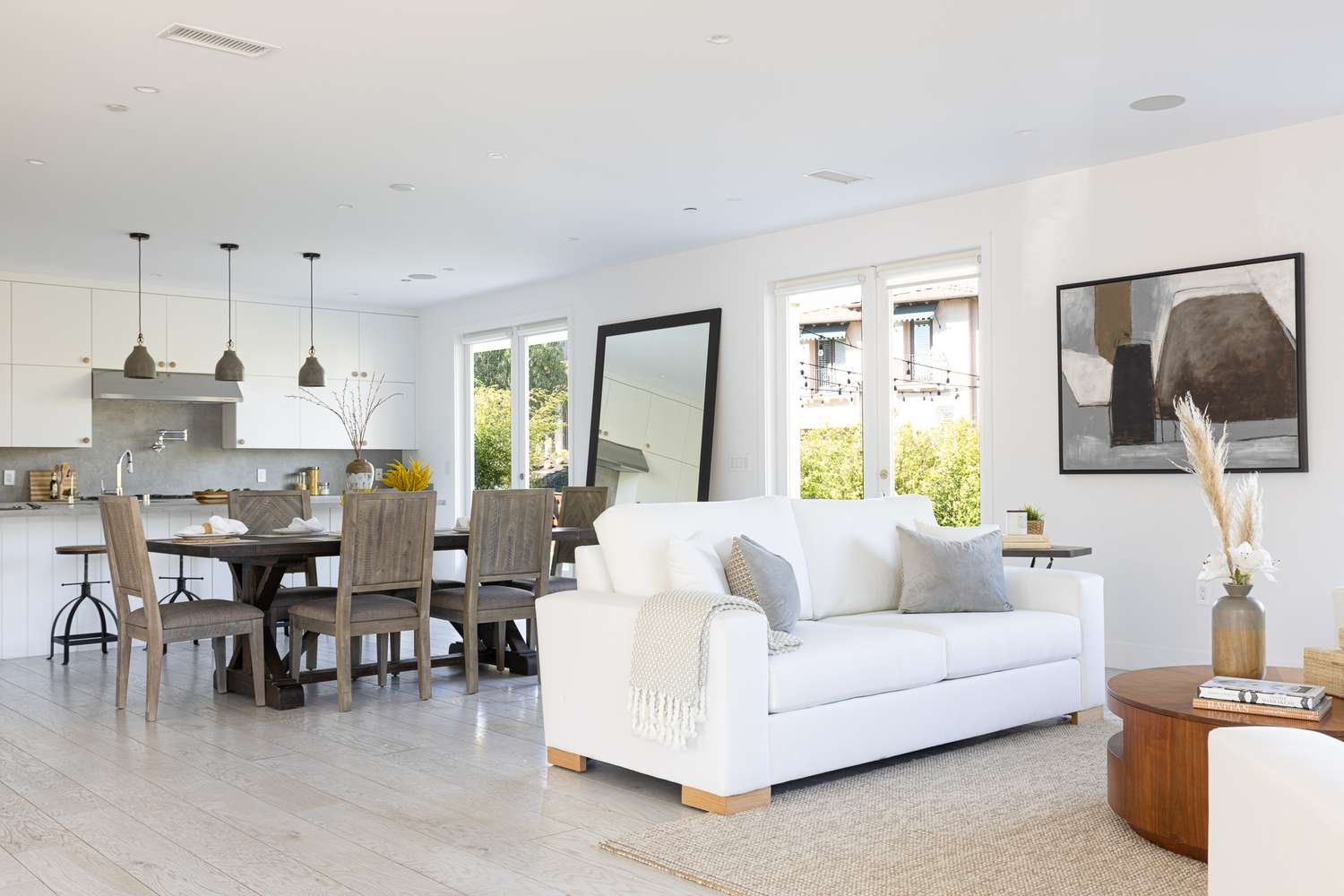
This sample uses the default confidence_threshold=0.25, analyzes the
1500x1000 input at the default 1080px scene-analysis cap, and reconstructs one
high-confidence component with production-default mesh settings:
| Component | Class ID | Confidence | Mesh vertices | Mesh faces | Point-cloud points |
|---|---|---|---|---|---|
| couch | 57 | 0.974 | 60,344 | 120,684 | 200,000 |
What It Does
The scene pipeline is:
- Resize the image for depth and object analysis when
max_input_dimensionis set. - Estimate scene depth.
- Detect and segment objects.
- Map selected object masks back to the original image.
- Crop each object with padding.
- Enhance each crop before reconstruction.
- Run
Object3DReconstructionon each enhanced crop.
Each selected crop always goes through foreground isolation inside the nested object reconstruction task. Crop enhancement is always applied for the scene pipeline; there is no option to disable it.
The output geometry is uniformly gray. Scene components are not texture-baked.
Install and Runtime Assets
Install vizion3d with the hardware extra for your machine, for example
vizion3d[cpu], vizion3d[mps], vizion3d[cuda], or vizion3d[amd].
Those hardware extras include the reconstruction runtime dependencies. See
the Hardware Acceleration page for the supported
install commands.
The task applies these processing stages to the input image:
| Stage | Work done |
|---|---|
| Scene analysis | Estimate depth and object layout from the scene image. |
| Object selection | Detect, segment, and rank candidate objects. |
| Crop preparation | Map selected masks to the original image, pad each crop, and enhance it. |
| Foreground isolation | Remove background pixels from each selected crop. |
| Reconstruction | Generate and clean a gray mesh, then sample a gray point cloud. |
The reconstruction runtime asset bundle is resolved the same way as
Object3DReconstruction: explicit model_bundle,
VIZION3D_RECONSTRUCTION_MODEL_BUNDLE, ~/.cache/vizion3d/models,
repository root, then the default essentials-v1 GitHub release asset URL.
Direct download: scene-components-3d-models.zip
Python Usage
from vizion3d.reconstruction import (
    Object3DReconstructionConfig,
    SceneComponents3DReconstruction,
    SceneComponents3DReconstructionCommand,
    SceneComponents3DReconstructionConfig,
)

command = SceneComponents3DReconstructionCommand(
    image_input="scene.jpg",
    model_bundle="/path/to/reconstruction-assets.zip",
    advanced_config=SceneComponents3DReconstructionConfig(
        max_input_dimension=1080,
        max_objects=3,
        confidence_threshold=0.25,
        padding_ratio=0.15,
        object_config=Object3DReconstructionConfig(
            max_input_dimension=1080,
            point_count=200_000,
            device="auto",
        ),
    ),
)

result = SceneComponents3DReconstruction().run(command)

for component in result.components:
    print(component.label, component.confidence, component.vertex_count)
Command Parameters
| Parameter | Type | Required | Default | Description |
|---|---|---|---|---|
image_input |
str \| bytes |
Yes | — | Scene image path or raw image bytes. |
model_bundle |
str \| None |
No | Auto-resolved | Path to the reconstruction runtime asset bundle. |
depth_model_backend |
str \| None |
No | Depth default | Optional depth-analysis backend override. |
annotation_model_backend |
str \| None |
No | Annotation default | Optional object-segmentation backend override. |
advanced_config |
SceneComponents3DReconstructionConfig |
No | Defaults | Scene selection and nested object reconstruction settings. |
Config
| Field | Default | Description |
|---|---|---|
max_input_dimension |
1080 |
Caps the longest scene-analysis side for depth and segmentation. Set 0 to disable only this scene-analysis resize. |
max_objects |
0 |
Maximum number of detected objects to reconstruct. 0 means no explicit cap. |
confidence_threshold |
0.25 |
Minimum detection confidence for selected components. |
padding_ratio |
0.15 |
Padding around each object crop before enhancement and reconstruction. |
object_config |
object defaults | Nested Object3DReconstructionConfig applied to each selected crop. |
Result Fields
| Field | Type | Description |
|---|---|---|
components |
list[SceneComponent3D] |
Reconstructed detected objects. |
source_image_size |
tuple[int, int] |
Original input image size (width, height). |
analysis_image_size |
tuple[int, int] |
Image size used for depth and segmentation analysis. |
depth_backend_used |
str |
Resolved depth-analysis backend. |
annotation_backend_used |
str |
Resolved object-segmentation backend. |
reconstruction_backend_used |
str |
Resolved reconstruction runtime asset directory. |
Each component includes:
| Field | Description |
|---|---|
label, class_id, confidence |
Detection metadata for the selected object. |
bbox_2d |
Source-image box [x1, y1, x2, y2]. |
mesh |
Gray trimesh.Trimesh. |
point_cloud |
Gray open3d.geometry.PointCloud. |
vertex_count, face_count, point_count |
Geometry counts. |
REST and gRPC Jobs
The REST and gRPC server APIs run this task as a background job because a scene can contain multiple object reconstructions.
REST:
curl -X POST http://localhost:8000/reconstruction/scene-components-3d-reconstruction \
  -F "image=@scene.jpg" \
  -F "model_bundle=/path/to/reconstruction-assets.zip" \
  -F "max_objects=3" \
  -F "confidence_threshold=0.25" \
  -F "device=auto"
The response is 201 Created with a job_id. Poll with:
curl http://localhost:8000/reconstruction/scene-components-3d-reconstruction/9f0a...
While queued or running, polling returns 202. When complete, it returns 200
with reconstructed component meshes and point clouds under result.components.
Binary PLY fields are base64-encoded in REST responses.
gRPC:
RunSceneComponents3DReconstructionsubmits the job and returnsReconstructionJobSubmission.GetSceneComponents3DReconstructionResultpolls byjob_idand returnsSceneComponents3DReconstructionJobResponse.
Completed results are stored in a small temp job folder on the server machine.
Set VIZION3D_JOB_DIR to control that folder. A result can be retrieved up to
10 times and expires after 24 hours.
Device
The nested object config's device setting is propagated through the scene
pipeline. Scene analysis, crop enhancement, foreground isolation, and mesh
generation use the requested accelerator when the installed runtime supports it,
and retry on CPU if an accelerated stage fails. Mesh cleanup and point sampling
remain CPU operations.
Input Resolution
The scene-level max_input_dimension=1080 applies to depth and segmentation
analysis. Object crops are still taken from the original image, enhanced, then
independently capped at 1080 pixels by Object3DReconstruction before
foreground processing. Each crop is then normalized into the conditioning image
used for mesh generation. Set the scene-level limit to 0 to disable only the
depth and segmentation resize.
Practical Notes
- Detection quality controls what gets reconstructed. If an object is missed by
segmentation, it will not appear in
components. max_objectsis useful for latency control. Reconstructing many scene objects means multiple object reconstruction passes.- Component geometry is inferred from one crop. Occluded surfaces and backsides are predicted, not measured geometry.